Showing posts with label amazon integration services. Show all posts

Friday, 9 September 2016

How to start with Amazon Marketplace Web service?

How to start with Amazon Marketplace Web service | Velsof
From the time past, Amazon has significantly changed the structure of retailing.

When It comes to a marketplace structure of eCommerce, Amazon is a name which does not require an introduction. It has always moved a bit ahead of its competitors just because of the kind of innovation it makes in its structure. Amazon, a trillion dollar company, has gained this trust and confidence over a span of 20 years. From an online bookstore to a marketplace giant, it has covered a huge distance to earn so much of fame and brand identity.

By allowing other sellers to utilize its platform to sell and advertise their products, Amazon introduced the concept of a structured marketplace module of eCommerce. From then, its growth is encouraging a huge population of sellers to join hands with it and start making profit as the company grows its market. The reach of Amazon to the deepest corner of world cannot be neglected, and if fact, this is the only reason that encourages the sellers to expand their reach to the global customers with the innovative ides through the Amazon Integration. This service helps the retailers and suppliers in improving their sales and conversion rates exponentially.

How can a seller take his share of advantage from this platform?

1. All the interested sellers have to register themselves on the Amazon Seller Central first-

Follow these steps would help them to get registered-

Step 1: Go to the Amazon Seller Central page, and you will find a page just like below.

Step 2: Click on the Register now link.

Step 3: Fill all the details asked in the form and save it.

Next step to follow after registration is done successfully?

When you finish the registration  procedure and submitted it, at last, you can now utilize the Amazon Marketplace Web administration (Amazon MWS), as an incorporated administration API. It's a great opportunity to enhance your business development, item deals with a quicker and enhanced response  time. For this, you have to join your site information with Amazon MWS. Once a seller is enrolled, he will get these three credentials:

1. A developer Account Identifier of 12 digits. Which could look something like this, 1234-4567-8910.

2. Next, you will receive AWS Access Key Id, which is a 20 character Alphanumeric code, may look like, 657ABC2GFIFJKJ87DGCB.

3. Secret Key of 40 characters such as

vJcTyVSFgHPLTM/GdmEJH/aVvTBuCf5zB+d0+ct

How to use these credentials?

You will need to utilize these credentials  for getting to your Amazon Seller account through the MWS.

The access  Key ID is connected to your Amazon MWS Registration. You can utilize this Key while asking for any administration from Amazon. The Access Key gives a more secure and better confirmation notwithstanding a computerized signature which you need to use in each solicitation to Amazon. Once the verification procedure is finished, effectively you can now see your Seller ID, Marketplace ID, and MWS Authorization Token on the screen. Save these accreditations with you as you will required every one of these credentials for future administrations.

Next step is to go for Product listing on Amazon-

You can deal with your product listing on Amazon Marketplace by your own. It's an ideal opportunity to begin your offering on Amazon. You can list your items by utilizing two sorts of strategies. One is by done physically by using API Credentials; other is by importing the required fields.

Monday, 18 July 2016

Amazon Integration Tips - How to win a Buy Box on Amazon Marketplace?

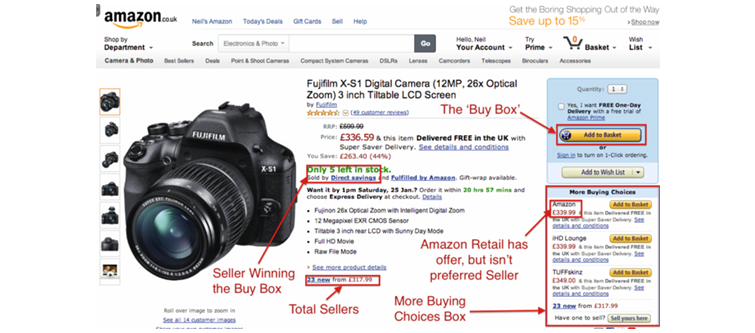
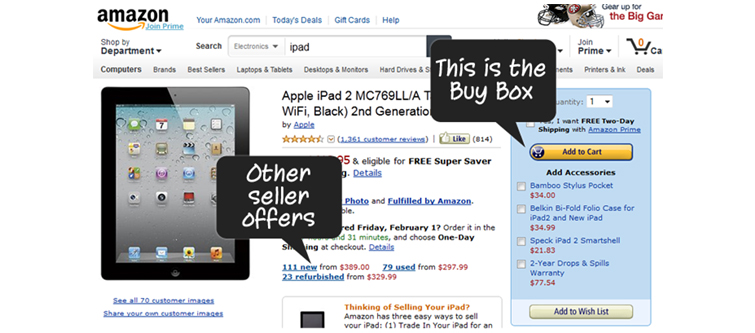
Amazon deals with a large number of sellers on Amazon integration service on the marketplace. It is not possible to feature each seller on top on a product page. For this, Amazon utilizes the feature of Buy Box that sets a formula with plenty of other factors to feature a particular seller on the top on a product page. Once you are recognized as eligible for Buy Box on Amazon Marketplace Web Service, your products featured on the product pages are given an “Add to cart “ button for direct selling, something like the image given below.

Amazon Integration Tips - How to win a Buy Box on Amazon Marketplace | Velsof
Buy Box allows a seller to get emphasized on a product page for some particular product on AMWS.

Winning tips to achieve a Buy box for your products:

1. Check if you are eligible for Buy Box -

Eligibility to utilize a Buy Box feature by a seller could be seen as affected by the multidimensional criteria. Earlier featured merchant status was taken into consideration, but Amazon decided to drop this criterion to provide each seller to equal opportunity on the AMWS platform. Here are some essential criteria you must fulfill to be eligible:

You should have a Professional seller account on Amazon Marketplace Web Service
Have been trading for at least 2-6 months.
Or you can win Buy Box directly by opting Fulfillment By Amazon service.
You should have enough stock to let Amazon fulfill your delivery or delivery by yourself. 

2. Research your performance factors-

Some performance determinants which affect your eligibility are as follows:

You must be a successful seller on Amazon Marketplace- Amazon takes into consideration your history of successful selling on the marketplace. If you have already fulfilled a significant number of orders successfully then your chances to win the Buy Box increases respectively.

Your ability to provide a satisfying customer service- your ability depends on the factors such as

Response efficiency to the customers.
The speed of delivery of products.
Product delivery without an error.
Least number of canceled orders.
The condition of products that are finally delivered.

3. Total Price of products-

Many people would say the price is the only factor which Amazon sees as a leading criterion, but the truth is not the same. The price of a product is an essential part of the factors which affects your eligibility but not is the only factor. The total price of a product is the price taken by the seller to sell a product finally and get it delivered to the specified address.

Make your price of products competitive enough

It does not mean you ask for the cheapest price, but it should be one of the lowest prices among the other sellers.

Always be updated with the latest pricing of products by your competitors.

4. Amazon gives Buy Box to New products only-

The feature of Buy Box applies to the new products only, although there is another buy box for used products that uses some other criteria to be satisfied. To secure your chances to win, you must sell new products as it will make Amazon confident about the condition and quality of your products.

5. Positive customer reviews-

Amazon integration tips- Positive customer reviews | Velsof
A seller winning the Buy Box has a perfect combination of all the points mentioned above in the article.

Reviews play a paramount role in encouraging Amazon to grant you a Buy Box feature. The number of positive reviews increases your chances by making Amazon confident about the products you are promoting on the Amazon Marketplace web services. Conversely, negative reviews diminish your chances to win a Buy Box. So, manage your products and services quality so as to get the maximum possible positive comments and reviews.

So, these are some important factors and tips that can adversely affect your eligibility to win a Buy Box feature on Amazon Marketplace Web Services. Refer to the screen shot above to see a perfect example of a winning seller on the Amazon Marketplace. You should remember these tips while you plan to win the same for your online store on the Amazon Marketplace.